Don’t start by comparing prices. Start by checking whether your phone can actually take a Korean SIM or eSIM, then decide what your home number still needs to receive. Only once both are settled does it make sense to compare LG U+, KT and SK Telecom’s tourist products — because underneath a similar-looking price, they are not the same product.
That ordering — handset, then home number, then the exact product, then its clock, then price — is my own editorial sequence, not something any of the three carriers publishes. It exists to rule out an unusable option before it costs you money you can’t get back.
Check the handset before anything else
Two checks, on the phone travelling with you, before a single price matters.
Carrier lock. On an iPhone, check Settings > General > About > Carrier Lock. Anything other than “No SIM Restrictions” means a Korean SIM or eSIM won’t activate, whatever the checkout page promises.
eSIM support, and whether there’s a SIM tray at all. Apple confirms eSIM on every US-purchased iPhone 14, 15 and 16-series model, including 16e — none has a physical SIM tray, so eSIM is the only option there. Older XS, XS Max and XR models take either an eSIM or a nano-SIM. Region matters: in mainland China, Apple’s page lists only the iPhone 18 Pro, iPhone 18 Pro Max, iPhone 17e and iPhone Air as supporting eSIM, so check Apple’s page for your model. Some Hong Kong and Macao models carry two physical SIM slots instead of one plus eSIM. Check your model’s purchase region, not just its name.
On a Samsung Galaxy, Samsung’s support guide points to Spec > Network/Bearer > SIM Size, looking for “Embedded-SIM” — but that guide is written for the Australian market and doesn’t confirm the same list for a Korean or global unit. Check your device’s own settings instead.
LG U+ excludes Google Pixel, Motorola and OPPO outright on its compatibility panel; a shorter FAQ repeats Pixel and OPPO but leaves Motorola out — no LG U+ page says which list governs, so treat the FAQ’s silence as a gap and Motorola as excluded too.
Decide what your home number still needs to receive
This is the constraint every price table skips, and it’s the same across all three carriers: none of their tourist SIM or eSIM products support banking or government identity verification.
LG U+ splits it by product: its Voice/SMS lines — the Data+Voice eSIM and the Data+Voice SIM card — carry ordinary app verification (the kind restaurant and taxi apps use), but its data-only eSIM can’t do SMS verification at all. KT states the same personal-authentication limit, and its Data Only line can’t be topped up to add voice later — a different product, not an add-on. SK Telecom’s tourist eSIM allows incoming voice and SMS after passport verification, but rules out personal authentication and a payment-related text receipt on the same line.
If anything on your trip depends on a code landing on your home number — a bank app, two-factor login, courier update, or one of the apps you set up before flying — it has to keep working on your home line, not the Korean one.
Apple’s own instructions confirm an iPhone can run a travel eSIM for data while keeping the primary line on for calls and texts — though home-carrier roaming fees can still apply to that primary line even while it isn’t carrying your data.
My own read, not something any carrier states: on a dual-line phone, leaving your home line on to keep that number reachable can be worth the roaming charge — but only if your home carrier offers service in Korea, your phone genuinely supports both lines at once, and you’re willing to pay its rate. Confirm all three before you fly; neither delivery nor a fee-free outcome is guaranteed.
Three products, not one “SIM” or “eSIM”
“Data” doesn’t mean the same purchase at each carrier, and that difference decides more than the price does.
| Carrier | Named product | What it actually includes | Verification |
|---|---|---|---|
| LG U+ | Data eSIM | Data, plus incoming calls and texts; no outgoing | No SMS verification support |
| LG U+ | Data+Voice eSIM and Data+Voice SIM card | Data, plus voice and SMS bought separately | Passport uploaded; for the eSIM, also presented at the airport counter to receive the QR code |
| KT | Data eSIM | Data, plus free incoming calls and texts after the identity (entry) check; no outgoing; voice cannot be added | Personal authentication unsupported |
| KT | eSIM (Data/Call/SMS) | Data, calls and texts; sold at the airport counter only | Passport and entry verification required there |
| SK Telecom | LTE eSIM (Data, Call, SMS) | Data plus incoming voice/SMS after verification; outgoing needs paid recharge | Passport verified by voucher or at the airport counter |
KT’s product table states where each is bought, in its English and Korean editions alike: the Data/Call/SMS eSIM is sold at the airport roaming counter only, and the Data eSIM can be bought online or at the counter — matching the table above, since the counter is the only place KT sells the eSIM that includes outgoing calls.
Even “unlimited data” isn’t one policy. KT’s Data plan gives 11GB a day at full speed, then drops to 5Mbps until the daily allowance resets at midnight. SK Telecom advertises unlimited data at up to 100Mbps. LG U+ advertises unlimited LTE with no stated speed ceiling but keeps a speed-management clause (its English page ties it to excessive network congestion, its Korean page to abnormal high-volume traffic) — a daily cap, a speed ceiling and a speed-management clause, three different limits, none interchangeable.
Eligibility differs too. SK Telecom excludes Korean-passport holders outright, restricts dual nationals’ voice and SMS, and may restrict stays beyond 90 days. KT requires purchase details to match your passport and caps total use — including any extension — at 90 days from first activation. LG U+’s listed terms require passport details for its SIM and Data+Voice eSIM.
What each one actually costs
These are listed base prices, not a checkout total — they exclude added voice credit, any 5G option, and coupon pricing.
LG U+ LTE base prices, by day
| Days | Price | Days | Price |
|---|---|---|---|
| 1 | ₩6,500 | 9 | ₩37,500 |
| 2 | ₩12,000 | 10 | ₩38,500 |
| 3 | ₩18,000 | 15 | ₩55,000 |
| 4 | ₩23,000 | 20 | ₩60,500 |
| 5 | ₩27,500 | 30 | ₩71,500 |
| 6 | ₩32,000 | 40 | ₩99,000 |
| 7 | ₩35,000 | 60 | ₩143,000 |
| 8 | ₩36,500 | 90 | ₩192,500 |
LG U+’s Data+Voice eSIM adds voice separately, in fixed tiers: 20 minutes for ₩5,500, 40 for ₩11,000, 60 for ₩16,500, 80 for ₩22,000, 120 for ₩33,000, 160 for ₩44,000 and 200 for ₩55,000 (the Korean page labels each tier as about that many minutes), with texts drawn from the same balance.
SK Telecom LTE eSIM base price, by day
| Days | SK Telecom LTE eSIM |
|---|---|
| 1 | — |
| 2 | ₩12,000 |
| 3 | ₩18,000 |
| 4 | ₩23,000 |
| 5 | ₩27,500 |
| 6 | ₩31,900 |
| 7 | ₩35,000 |
| 8 | ₩36,300 |
| 9 | ₩37,400 |
| 10 | ₩38,500 |
| 15 | ₩55,000 |
| 20 | ₩60,500 |
| 30 | ₩71,500 |
| 60 | ₩107,000 |
| 90 | ₩143,000 |
A dash means no listed row for that length, not proof it isn’t sold. KT’s price list isn’t reproduced here — read it on KT’s own eSIM page before you compare. This page doesn’t rank the three carriers by price, and the verification and speed differences above matter more than a price row.
When the clock actually starts
LG U+ measures use from first data use, not purchase, but you must activate within 60 days of buying it. If you only need data, its Data eSIM is the one product here whose clock plausibly survives early installation, since it starts on first use rather than purchase or a scan. That’s my inference, not LG U+’s guarantee: its terms confirm the first-use clock and the 60-day window, not that pre-departure installation is supported here, so confirm before relying on it.
SK Telecom’s QR code can be scanned any time within 180 days of purchase, but its usage period only starts once you scan it, counted in 24-hour blocks. Scan an SK Telecom eSIM at home before you fly and you start burning days before you land.
Both KT pages state 90 days from purchase in their install instructions. KT’s English page, though, carries a different line in its Caution list — install within 30 days or the eSIM is cancelled with no refund. KT’s Korean page has the matching line in the same place, but at 90 days: use it within 90 days of purchase, or it is cancelled automatically, with no refund. So the two editions differ in the number, not in whether the cancellation rule exists, and neither page says which figure KT enforces, so install within 30 days of purchase, which satisfies both readings. Expect to see the 30-day line if you read KT’s English page directly; it’s a real discrepancy on KT’s own site, not an error here, and separate from the 90-day total-use limit above.
Once installed, KT’s usage clock runs from the moment installation completes, in 24-hour blocks — but only KT’s Korean page says so; its English page has no clock line. It is the same shape as SK Telecom’s, anchored to installation instead of a scan. KT’s Korean page also carries a warning with no English equivalent: leave data roaming on and the phone falls back to it automatically, billed, once the eSIM’s validity period ends — KT recommends switching it off first. This warning exists only on KT’s Korean page.
Collecting it at the airport
Incheon Airport’s own facility directory lists SK Telecom, KT and LG U+ counters in both terminals — the same terminals covered in Incheon Airport to Seoul — confirming the counters exist, not what each has in stock the day you land. In Terminal 1, each of the three has an arrivals counter open 00:00–24:00 near Arrival Hall F on the west side of the first floor, and a second open 06:00–22:00 near Arrival Hall A on the east side; both terminals also have separate departure-floor counters for outbound travellers.
KT’s and SK Telecom’s own roaming-centre pages, which are in Korean only, put the 24-hour counters opposite exit 13 and the 06:00–22:00 counters opposite exit 2, with the same hours. LG U+ places its two counters at Gate F and Gate A, the arrival-hall letters the airport directory uses, and gives no exit number, so pairing LG U+ with exit 13 or exit 2 is my inference from the shared locations, not LG U+’s statement. KT’s and SK Telecom’s pages are written for their own customers travelling abroad, so they place the counters; they don’t say what a visitor can buy there.
On wireless, here is one dated reading, not a promise. When I checked Terminal 1 on 2 October 2026, AirportWiFi(Free FAST) connected with no password or sign-up, and fast.com showed 14 Mbps down while the test was still running. I didn’t try installing an eSIM on it, so all I can say is that it looked fast enough to download one. That is one reading at one time and place; don’t plan your arrival around it.
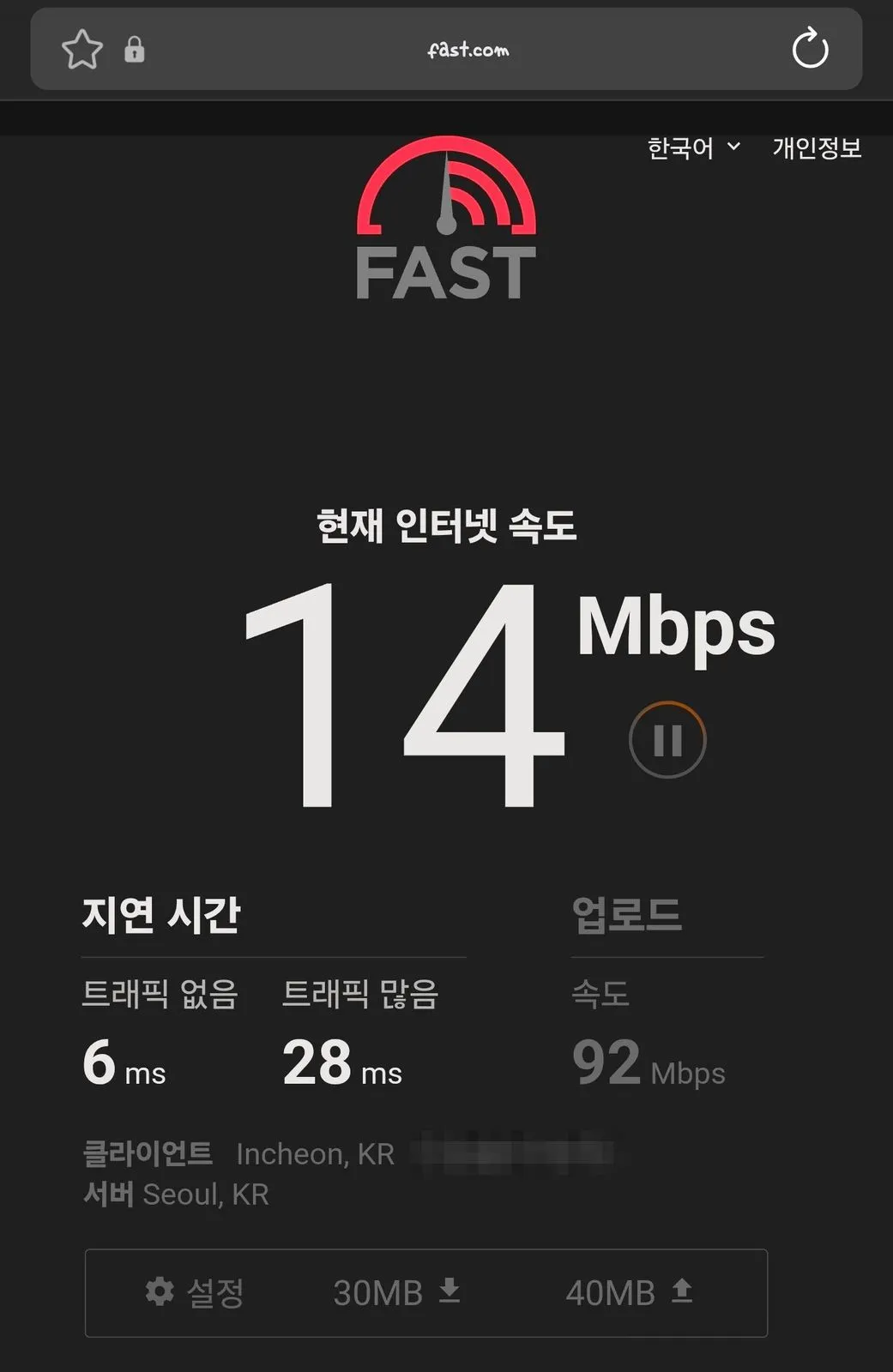
What fast.com showed on the author’s phone on the airport Wi-Fi at Incheon Airport Terminal 1 on 2 October 2026. Photograph by the author.
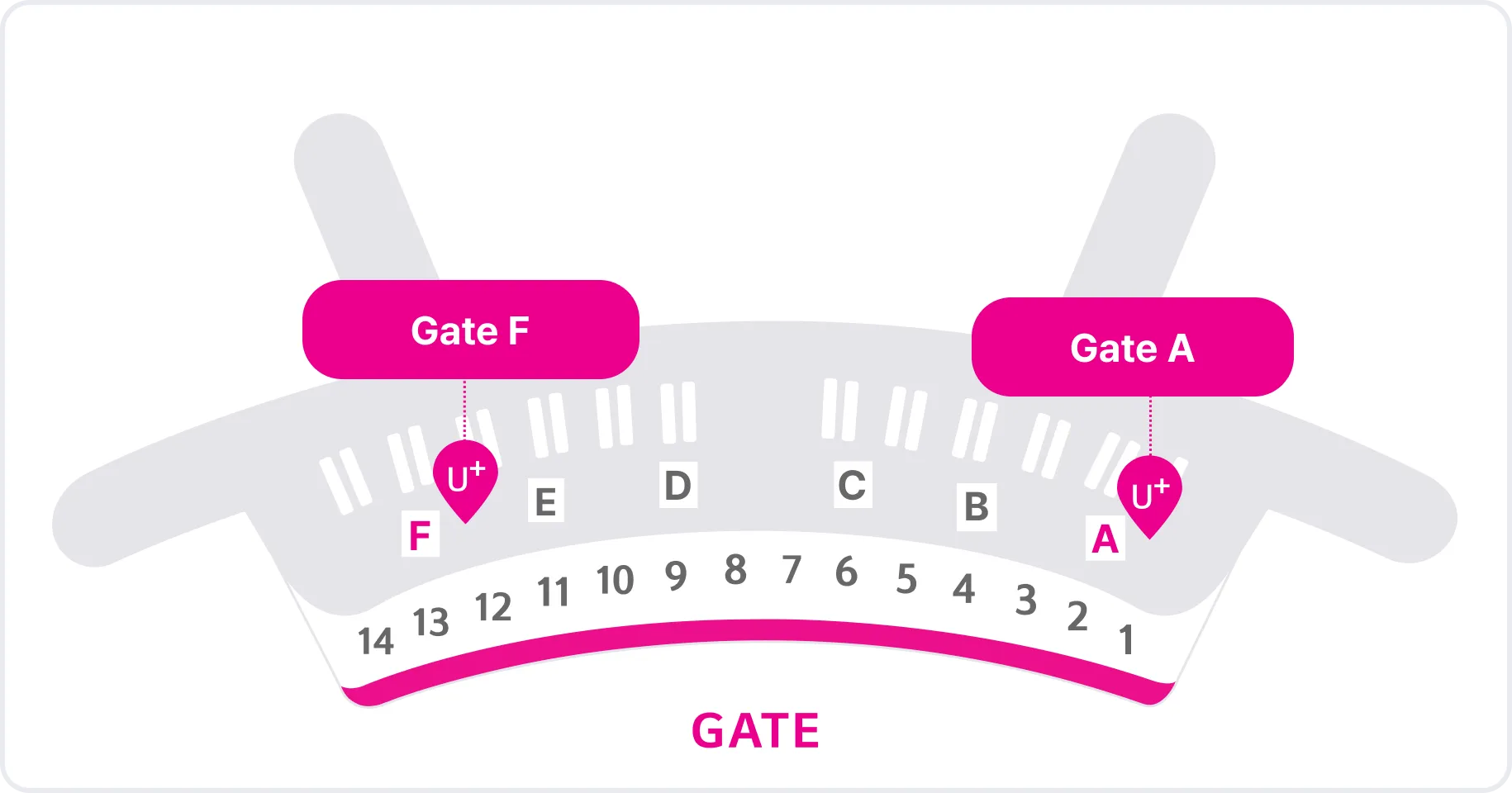
LG U+’s own diagram of where its two counters sit in the Terminal 1 arrivals hall. It shows LG U+ only, not the other carriers. Image: LG Uplus Corp., lguplus.com.
LG U+ states its own Terminal 2 numbers on two of its own pages: Gate 3 (24 hours) and Gate 8 (06:00–22:00). The airport’s own directory numbers the same two counters Exit 4 and Exit 7 instead — different doors, identical hours. In Terminal 1 the two sources agree completely, so this looks like two numbering systems for the same doors, not one source being wrong. Start from LG U+’s Gate 3 or Gate 8, but confirm on-site rather than commit to one number in advance — the printed sign may read Exit 4 or Exit 7 instead, including on a competitor’s guide.
Buying for a group matters too: LG U+’s ordinary eSIM notice allows up to three items per passport, but its CHECK iN SEOUL bundle — sold with a payment card — allows only one item including the eSIM or SIM, a different limit for a different product. One perk sits on the ordinary products only: LG U+’s eSIM page lists a free T-money card for purchases of 3 days or more with airport pickup, and its SIM Card page lists one for 3 days or more, while the CHECK iN SEOUL page doesn’t mention it — see T-money or a Climate Card for what to do with it.
If your phone fails the first check, or the counter has no stock
A Korean eSIM needs a phone with eSIM support, and no Korean SIM or eSIM works on a carrier-locked phone — no price here fixes that. A phone with a SIM tray but no eSIM support can still take a physical tourist SIM: LG U+, KT and SK Telecom each sell one. For a locked phone, the fallback is your home carrier’s Korea roaming, if it offers one. That’s a fallback, not a bargain, and nothing here promises it works the moment you land — get its price and coverage in writing before you fly.
For general background, not a specific plan: the Korea Tourism Organization’s overview page, last updated September 11, 2026, says major convenience store chains including CU, GS25, 7-Eleven and Emart24 sell physical USIM cards, though stock may vary by branch, and that roaming centers at airports sell prepaid USIM cards.
What I’d check, in order
Carrier lock and eSIM support, on the phone travelling. What your home number has to keep receiving, and whether your home carrier can cover that in Korea. The exact named product at each carrier, not just “SIM” or “eSIM.” When its clock actually starts, against your real travel dates. Only then, price.
Get to the airport with that settled and the counter becomes a quick stop instead of a decision you’re making standing up, jet-lagged, with a queue behind you.